
AI virtual staging for empty listings
Empty rooms photograph small and cold, and buyers struggle to picture living in them. Listpal's AI virtual staging furnishes an empty room in the style you choose, placed to the room's own light and perspective, with the walls, floor and windows left exactly as they are — for a fraction of the cost of physical staging.
7-Day Free Trial. Cancel Anytime.
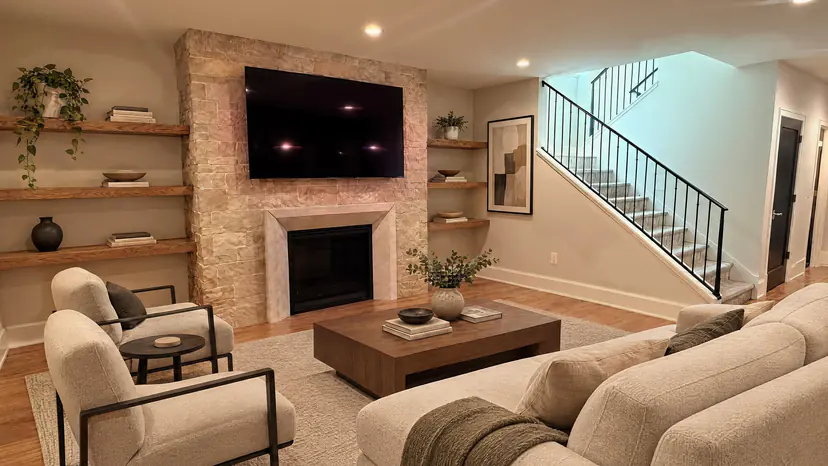
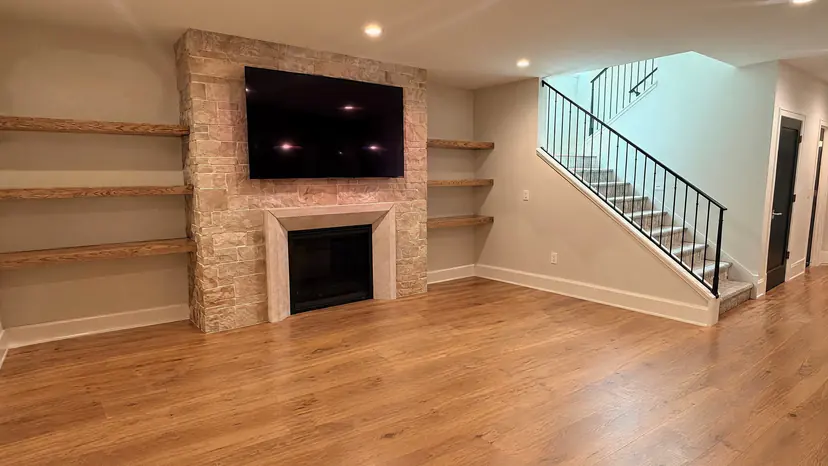
How it works
- Step 1
Upload the room
Start from an empty room — or a furnished one: Clear room takes the existing furniture out first.
- Step 2
Pick the room and style
Living room, bedroom, dining room, kitchen, home office or patio; modern, transitional, farmhouse or traditional.
- Step 3
Download the staged photo
Furniture, rugs, lamps and art, placed to the room's own light. Not quite right? Stage it again.
Why virtual staging helps empty listings
Furniture tells a buyer what a room is for and how big it is. An empty bedroom gives no sense of scale; the same room with a bed, nightstands and a rug does. Virtual staging gives every empty room in a listing that, without renting furniture or booking movers.
It is also the fastest way to show a vacant home's potential online, where most buyers first see it — on the MLS, Zillow and Realtor.com, often on a phone.
What Listpal adds — and what it leaves alone
Listpal adds furniture, rugs, lamps and art. It keeps the room's architecture: walls, flooring, ceilings, windows and fixtures stay as they were photographed, so the staged photo is still a true picture of the space.
The furniture is placed to the room's perspective and lit by its own windows, so it sits in the room rather than on top of the photo.
Rooms and styles
Stage a living room, bedroom, dining room, kitchen, home office or patio in a modern, transitional, farmhouse or traditional style. Every staged room starts from your photo after Listpal's normal enhancement, so it comes back bright and straight as well as furnished.
Disclosing virtual staging
Most MLSs, and many state rules, require virtually staged photos to be labelled as such — often with a caption like “virtually staged” — and some ask you to include the unstaged photo too. Keep the original alongside the staged version, and check your MLS's rules before you publish.
What virtual staging costs
Virtual staging is included on Plus ($59.99/mo), Max and Business. On Starter, add it when you need it with a booster pack from your dashboard, from $24.99 for 10 rooms. Every subscription starts with a 7-day free trial.
Questions agents ask
How much does virtual staging cost?
It is included on Plus ($59.99/mo for 150 photos), Max and Business. Starter subscribers can buy a booster pack, from $24.99 for 10 staged rooms.
Is virtual staging allowed on the MLS?
Generally yes, as long as it is disclosed. Most MLSs require virtually staged photos to be labelled, and some want the original shown as well. Rules differ between MLSs, so check yours.
Can Listpal remove the existing furniture first?
Yes. Clear room empties a furnished room, and you can stage the result in any style.
Which rooms and styles can I stage?
Living room, bedroom, dining room, kitchen, home office or patio, in a modern, transitional, farmhouse or traditional style.
Does staging change the walls, floors or windows?
No. Listpal adds furniture and decor and keeps the room's architecture as photographed.
More from Listpal
- Real estate photo editingEvery listing photo brightened, balanced and straightened in minutes.
- Virtual declutteringClear bins, cables, dishes and boxes — or yourself in a mirror — in one press.
- Sky replacementGrey skies swapped for blue on every exterior, automatically.
- iPhone photography guide12 habits that make phone listing photos look professional.
Or see every feature and plans and pricing.
Snap the photos, upload them, and see what Listpal sends back.
Try any subscription free for 7 days.
Meet the founders and see Listpal in action.