
AI real estate photo editing that starts on your phone
Listpal is an AI photo editor built for real estate agents. Upload the listing photos you took on your phone and it edits every one the way a professional real estate photo editor would — brighter rooms, balanced windows, straight walls, blue skies, less clutter — and hands them back MLS-ready in minutes, not days.
7-Day Free Trial. Cancel Anytime.
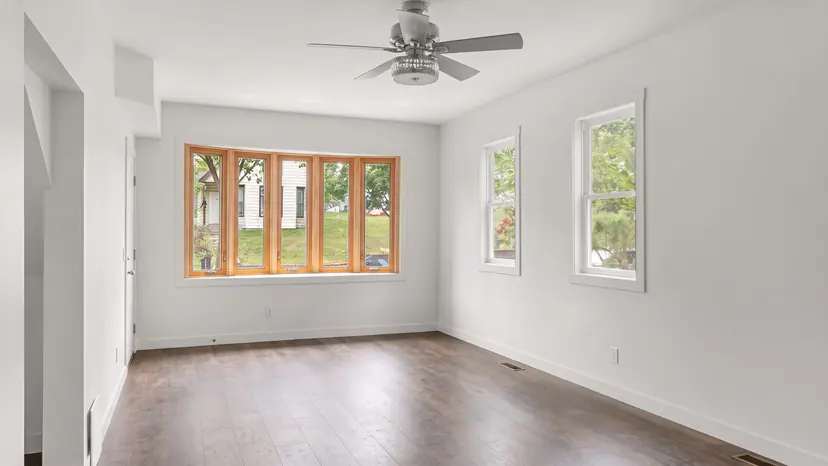
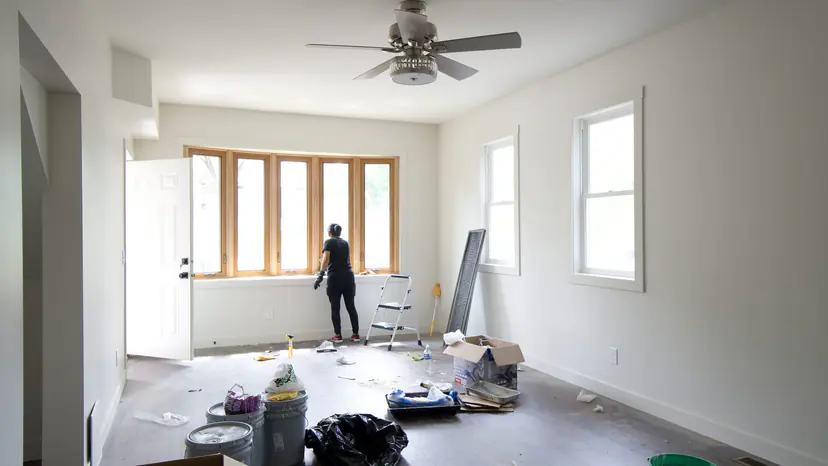
How it works
- Step 1
Shoot the listing
Walk the home with your phone. No tripod, flash or lighting kit — a few habits, covered in our iPhone guide, do more than any gear.
- Step 2
Upload the whole set
JPEG, PNG, WebP or the iPhone's HEIC files, straight from the camera roll. Listpal works out which frames are interiors and which are exteriors and edits each one accordingly.
- Step 3
Download and list
A full listing is typically back in about five minutes. Re-render any frame with different settings, then download and upload to the MLS.
What Listpal fixes in every listing photo
Phone photos of a home go wrong in the same handful of ways. Listpal corrects each of them in one pass, with no sliders, layers or masks to learn:
- Dark rooms — exposure and shadows lifted so rooms look as bright and open as they feel in person.
- Blown-out windows — bright windows pulled back so the view outside shows instead of a white glare.
- Mixed lighting — warm bulbs and cool daylight balanced into clean, neutral whites.
- Crooked shots — leaning walls, verticals and horizons straightened.
- Grey skies — a flat or overcast sky on an exterior replaced with a clear blue one.
- Stray objects — bins, cords and odds and ends tidied away, and with AI Remove (included from Plus) a counter or floor of loose clutter cleared in one press.
Why agents edit with AI instead of hiring it out
A professional shoot typically costs $400–$600 per listing and a day or three to schedule, shoot and edit. Outsourced editing services cost less, but you still wait on a turnaround and chase revisions.
Listpal edits a whole listing in about five minutes, re-renders a frame the moment you want something different, and gives every photo the same finish — so a listing's photos match each other, and your last listing's.
Plans start at $29.99/mo for 50 photos, about 2 listings. Every subscription starts with a 7-day free trial.
Is AI photo editing allowed on the MLS?
Edits that make a photo show the room as it really looks — exposure, colour, white balance, straightening, a cleaner sky — are the corrections a professional photographer or editor makes on every shoot, and they are standard practice.
What MLS rules and the REALTOR® Code of Ethics prohibit is misrepresentation: hiding damage, removing permanent features such as power lines or a neighbouring building, or adding what isn't there without saying so. Listpal's enhancement is built for the first kind of edit, not the second. When you add furniture with virtual staging, label those photos as your MLS requires.
Rules differ from one MLS to the next, so check yours — especially for staged or decluttered photos.
Works with the photos you already take
Any recent iPhone or Android phone is enough. Listpal accepts JPEG, PNG, WebP and HEIC, the iPhone's default format, so you can upload straight from your camera roll. Photos from a DSLR or from a photographer work too.
Turn any step on or off and save it as a preset, and every listing after that comes back with the same look.
Questions agents ask
How much does real estate photo editing cost with Listpal?
Starter is $29.99/mo for 50 photos (about 2 listings), then $1 a photo. Plus is $59.99/mo for 150 photos and adds AI Remove and virtual staging. Every subscription starts with a 7-day free trial. Paying yearly gets you 12 months for the price of 10.
How long does editing take?
A photo takes a minute or two, and a full listing is typically ready in about five minutes — the same day you shoot it.
Can I edit photos from an Android phone or a real camera?
Yes. Listpal edits JPEG, PNG, WebP and HEIC photos from any phone or camera, including photos a photographer has already shot.
Will the edits look fake?
Listpal keeps the room's own walls, floors and fixtures and corrects light, colour and geometry, the way a professional editor would. If a frame isn't how you want it, re-render it with different settings.
Do I need to know photo editing software?
No. There are no layers, masks or sliders: upload, and the photos come back finished.
More from Listpal
- Virtual stagingFurnish an empty room in a modern, transitional, farmhouse or traditional style.
- Virtual declutteringClear bins, cables, dishes and boxes — or yourself in a mirror — in one press.
- Sky replacementGrey skies swapped for blue on every exterior, automatically.
- iPhone photography guide12 habits that make phone listing photos look professional.
Or see every feature and plans and pricing.
Snap the photos, upload them, and see what Listpal sends back.
Try any subscription free for 7 days.
Meet the founders and see Listpal in action.